


Neon LED Keyboard: RGB & Emoji
4.710.42K Reviews
App Specs
- Version
- 4.4.3
- Updated On
- License
- Free
- Downloads
- 50,000,000+
- Developer
- Maxlabs Personalization Tools
- Categories
- Personalization
- Platform
- Android, iOS
Screenshots

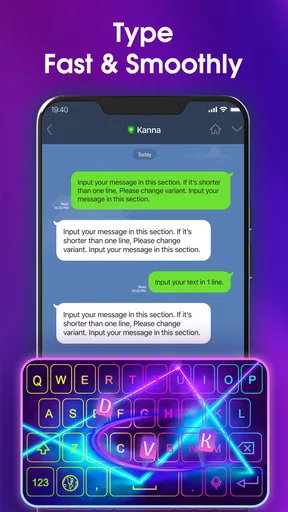
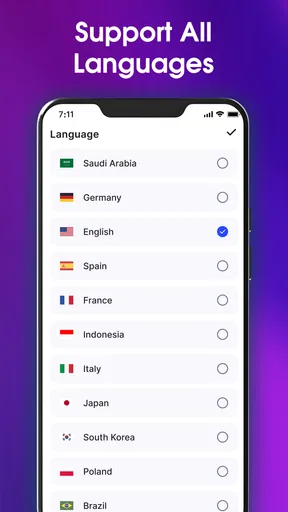
 Analysis by AppCompare
I judge a keyboard app less by how flashy it looks in a preview and more by whether its signature style stays pleasant after a week of ordinary messages. Neon LED Keyboard: RGB & Emoji puts colorful lighting at the center of the experience, turning the keys into a visible part of the phone’s look rather than leaving them as a plain utility. That focus is appealing if you enjoy personalizing your screen, though it also means the app is best suited to people who actively want their keyboard to stand out.
The main draw is not a complicated productivity system; it is the visual character of typing. That makes the choice fairly easy to frame: if a bright keyboard would make routine chats feel more personal, this app has a clear reason to try it. If you prefer a quiet, minimal layout that disappears while you write, a standard keyboard may suit you better.
What the neon effect changes
Colorful lighting gives the keyboard a stronger identity than the neutral layouts many people use by default. In practice, that can make a familiar screen feel more like your own, especially if you like coordinating your phone’s appearance or simply want a little color during everyday messaging. I see the lighting as the point of the app, not a feature that should be expected to make typing itself more efficient.
The effect is most enjoyable when it remains easy to read. A striking palette can look lively, but a keyboard is still a tool you need to scan quickly, often while thinking about the message rather than the keys. I’d choose a theme for legibility first, then decide whether the brighter look is comfortable over longer conversations. Personalization works best when it adds character without making each keystroke harder to follow.
Light Up Your Typing
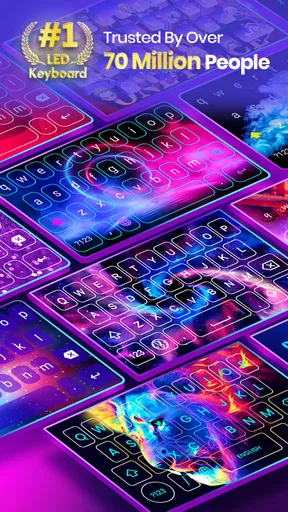
First off, let’s talk about the main attraction: the RGB lighting. If you’re someone who likes their tech with a side of pizzazz, this app has you covered. You can customize the colors to match your mood or your outfit—you do you! The neon glow is vibrant, making late-night texting sessions a visual treat.
Emoji Galore
Now, I know emojis are the soul of modern texting, and this app doesn’t skimp on them. The Neon LED Keyboard has an extensive emoji library, ensuring you have the perfect little face or icon for every occasion. Whether you’re feeling 😜 or 😢, there’s an emoji waiting for you.
How it fits into everyday typing
A keyboard is used across many kinds of apps, so it helps to decide what you want from it before making it your regular choice. If your messages are mostly casual chats, expressive punctuation and emojis can feel at home beside the bright styling. For a work email, a long address, or a message you want to keep restrained, the same visual boldness may matter less than predictable key placement and a clear view of what you’re typing.
Worth Reading Before You Choose

Baby Panda World Brings Quick Play to Modern Phones, but Its Game Library Feels Busy

ESPN’s Live Game View Makes Following Close Games Easier

QuizzLand Review: A Good Fit for Short Trivia Breaks, Not Every Player

Basketball Stars: Multiplayer Is Fast, but Can It Recover When Matches Go Wrong?

WEBTOON Turns Phone Updates Into a Better Reading Routine

Link to Windows Runs on Shared Habits, Not Social Feeds
One useful way to judge the look is to try it in different lighting rather than deciding from a quick glance at the setup screen. A vivid design that feels fun in a bright room can feel more intense when you are typing late at night. I’d also test a short message before using it for something important; that gives you a chance to see whether the key labels and your usual typing rhythm feel comfortable together.
Smooth Typing Experience
Looks aren’t everything, right? Thankfully, the app also delivers a smooth typing experience. The layout is intuitive, and the keys are responsive. I found that my typing speed improved because of the app’s predictive text feature, which suggests words as you type. It’s like having a helpful little assistant whispering suggestions as you go.
A realistic daily test
Picture checking a group chat on the way home and replying with a couple of quick updates. The colorful keys make the familiar act of answering feel less generic, while emoji access helps convey tone when a short text could otherwise sound abrupt. Later, if you switch to a longer message, the more useful test is whether suggestions and key placement still feel natural enough that you can focus on your words rather than the decoration.
For that reason, I would not judge the app only by its first few minutes. Keyboard habits are automatic: people rely on familiar spacing, muscle memory, and a consistent view of the keys. Give yourself a little time to learn the layout, and keep an eye on whether the visual theme remains comfortable during longer typing sessions. If you find yourself slowing down to admire or decipher the design, that is a sign the style is getting in the way.
Customization Options
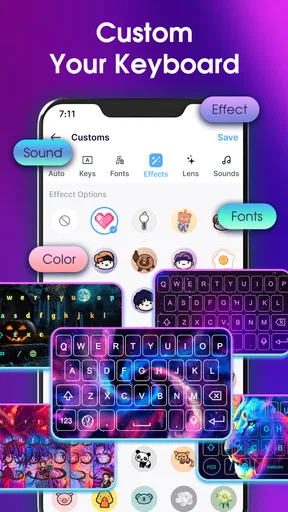
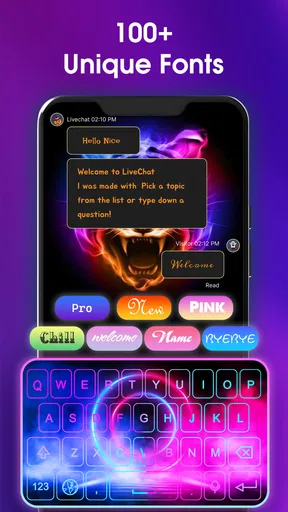
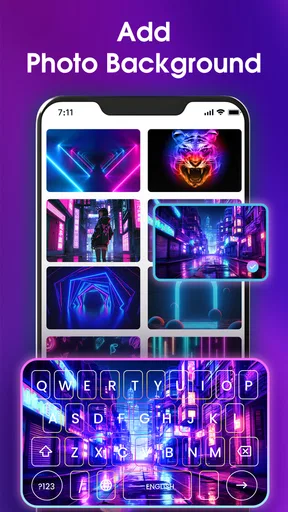
If you’re all about personalizing your tech, you’ll love the customization options here. You can change themes, fonts, and even key sounds. Want your keys to click like an old typewriter or swish silently? The choice is yours. It’s like having a wardrobe for your keyboard.
Making the customization useful
Rather than changing several things at once, I’d adjust one part of the keyboard and use it for a while. That makes it easier to tell whether a font improves readability or whether a sound becomes distracting. The same goes for color: a coordinated theme can look polished, but the most useful choice is the one that keeps letters easy to distinguish at a glance.
Sound is a personal preference, not an automatic upgrade. A key sound may make typing feel more tactile to you, but it can be annoying in a quiet room or around other people. If you often message in shared spaces, a silent setup is the considerate choice. If you enjoy audible feedback when typing alone, experimenting with the available sound options can make the keyboard feel more responsive without changing how you write.
Easy Installation and Setup
Installation is a breeze. Just a few taps and you’re ready to roll. The setup guide walks you through everything, making sure you’re not lost in the settings wilderness. Even if you’re not tech-savvy, you’ll be up and running in no time.
Choosing it over a standard keyboard
The usual built-in keyboard is often the practical baseline: it is familiar, integrated into the phone, and generally designed to keep attention on the text. This app makes a different trade. It puts appearance and expressive customization closer to the foreground, so it is a better match for someone who enjoys themes than for someone who wants the least noticeable typing surface possible.
Compared with choosing a keyboard mainly for advanced writing tools or a stripped-back interface, the deciding question here is whether a neon look adds enough enjoyment to justify changing a habit you use all day. If your current keyboard already feels comfortable and you rarely care about its appearance, switching may bring little benefit. If you regularly personalize your phone and enjoy expressive chats, the change has a more obvious purpose.
Privacy and practical caution
Now, on to something we all worry about: privacy. The app does request some permissions, and while it promises not to store your personal data, it’s always good to be cautious. Make sure you’re comfortable with the permissions you’re granting. Better safe than sorry, right?
Because a keyboard is involved whenever you enter text, I would treat the permission screen as a decision point rather than tapping through automatically. Read what the phone asks you to enable and consider whether you are comfortable using a third-party keyboard for the kinds of things you type. Someone who handles sensitive work messages or simply prefers not to change their system keyboard may reasonably decide to stick with the default option.
What to expect from the free app
This is a free personalization app from Maxlabs Personalization Tools, with optional in-app purchases ranging from $0.99 to $39.99 per item. The app has a 4.7 average from around 600,000 ratings, and it has passed 50 million installs. Those figures suggest it has broad appeal, but they do not tell you whether its particular visual style will suit your eyes or typing habits; trying the free version is the sensible way to make that call before considering any purchase.
It is rated for Everyone, was released on April 3, 2020, and its current version is 3.9.0, with Android 6.0 as the minimum operating system. If you are choosing it for an older phone, that minimum is the key compatibility detail to check. For someone with a supported device, the more personal question is whether the core look and everyday typing feel are enough to keep it installed.
Performance and Battery Usage
In terms of performance, the app runs smoothly without crashing, which is a definite plus. As for battery usage, I didn’t notice a significant drain, which is impressive given the visual effects. You won’t find your phone gasping for battery life after a few hours of use.
Who gets the most from it
I’d recommend giving it a try if you enjoy bright themes, want your keyboard to reflect your personality, or use emojis often in casual conversations. It is also a reasonable choice for someone who likes to refresh a phone’s appearance without changing the way they organize the rest of the screen. The strongest fit is a person who values visual fun but still checks that the letters remain clear and the layout feels comfortable.
I would skip it if you want a minimal keyboard, dislike bright colors, or are unwilling to review the permissions involved in enabling a third-party keyboard. It may also be the wrong choice if you depend on a particular familiar keyboard layout and do not want to spend time adapting. A plain built-in option is better when reliability and familiarity matter more to you than a distinctive look.
Final Thoughts
Overall, the Neon LED Keyboard: RGB & Emoji is a fantastic choice for anyone wanting to add a bit of fun and flair to their typing experience. It’s more than just a keyboard; it’s a vibe. Whether you’re a casual texter or a messaging maestro, this app will make your typing sessions a lot more colorful.
So go ahead, give it a whirl. You might just find yourself looking for excuses to send more messages, just to see those colors light up your screen!
Pros
- Vibrant
- customizable themes enhance typing experience.
- Seamless emoji integration for expressive messaging.
- User-friendly interface with intuitive navigation.
- Supports multiple languages for diverse users.
- Low battery consumption despite vivid graphics.
Cons
- Contains ads that may interrupt user experience.
- Limited free theme options without in-app purchases.
- Occasional lag on older devices.
- Requires internet for full functionality.
- In-app purchases can add up quickly.
FAQs for Neon LED Keyboard: RGB & Emoji
What features does the Neon LED Keyboard: RGB & Emoji app offer?
The Neon LED Keyboard app provides a vibrant typing experience with customizable RGB backlighting, a wide array of emojis, and themes. Users can personalize their keyboards with various color combinations and effects. Additionally, it supports multiple languages and offers predictive text and autocorrect to enhance typing efficiency.
Is the Neon LED Keyboard app free to use?
The app is available for free download, but it may offer in-app purchases. These purchases can include premium themes, additional emoji packs, and ad-free experiences. Users can choose to enjoy the basic features for free or enhance their experience with optional purchases.
How does the app impact device performance and battery life?
While the Neon LED Keyboard app is designed to be efficient, using vibrant RGB effects may slightly affect battery life and device performance. However, most modern devices can handle these effects without significant issues. Users concerned about battery usage can adjust brightness settings within the app.
Is the Neon LED Keyboard app safe to use regarding privacy?
The app requires certain permissions to function effectively, such as access to the keyboard and storage. It does not collect or store personal information without user consent. Always review privacy settings and permissions when installing any app to ensure your data remains secure.
Can I use the Neon LED Keyboard across different devices and platforms?
The app is available for both Android and iOS devices, but features may vary slightly between platforms. Users can download it from the Google Play Store or Apple App Store, ensuring compatibility with most smartphones and tablets. Always check for device-specific requirements before installation.


